
Best IPTV for Smart TV in 2026: Samsung, LG, Android TV & Google TV Guide
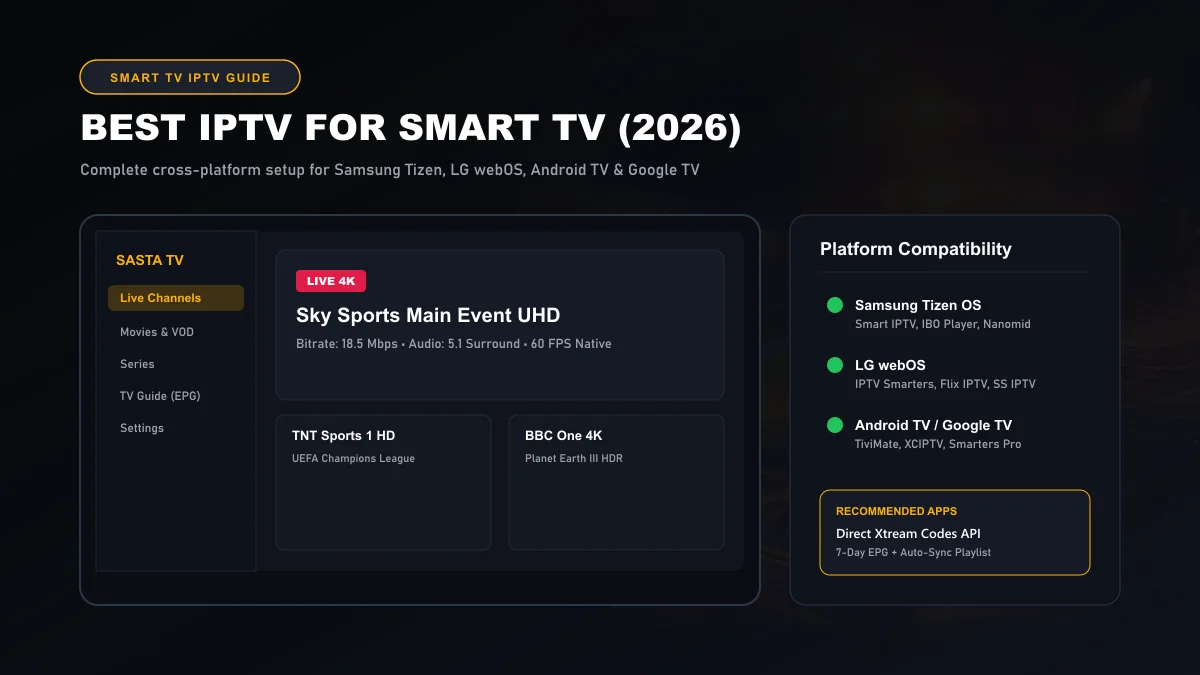
Streaming IPTV directly on a Smart TV delivers the cleanest living-room experience possible—eliminating secondary dongles, extra power adapters, and multiple remote controls. Whether your television runs Samsung Tizen OS, LG webOS, Android TV, or Google TV, high-performance IPTV is readily accessible in 2026 through native app stores and modern Xtream Codes API authentication.
What IPTV on Smart TV Means
Running IPTV on a Smart TV means using your television’s internal processor, memory, and operating system to decode digital video streams delivered across internet protocol (IP) networks. Unlike legacy cable or satellite systems that require an external converter box connected through HDMI, your Smart TV executes the media player application natively.
This native software approach provides several distinct advantages:
Single Remote Control Navigation
You navigate your entire 25,000+ live channel repertoire, electronic program guide (EPG), and on-demand video using your TV manufacturer's factory remote (such as the LG Magic Remote or Samsung SolarCell remote) with zero HDMI input switching.
Direct 4K HDR Panel Scaling
Because the stream renders directly on the television SoC, video feeds benefit from the TV's proprietary image processing engines (such as Sony Cognitive Processor XR or LG α9 AI Processor) without chroma subsampling losses over HDMI cables.
However, because Smart TV platforms differ radically in system architecture, app store availability, and memory headroom, your setup experience depends directly on which operating system powers your television.
Samsung Smart TV Compatibility (Tizen OS)
Samsung Smart TVs manufactured from 2017 onward run Samsung's proprietary Tizen OS. While Tizen is responsive and visually polished, it does not run Android APK files. You cannot sideload mobile Android applications onto a Samsung TV using standard browser downloads.
Instead, Samsung users must download dedicated Tizen media players from the official Samsung App Store. Learn more about system compatibility on Samsung Official Support .
Top IPTV Players for Samsung Tizen OS
- IBO Player Pro: The fastest and most stable player currently on the Samsung Apps store. Features rapid Xtream Codes API loading, 7-day EPG support, and customizable subtitle synchronization.
- Smart IPTV (SIPTV): The classic Smart TV player. It activates using your TV's physical MAC address. While simple, it requires uploading M3U playlist files via a web portal.
- Nanomid Player: A premium player with exceptional audio codec support (including AC3 and Dolby Digital Plus) and integrated parental pin controls.
Samsung Tizen Tip: Never fill your Samsung TV internal storage above 85% capacity. Older Tizen chipsets allocate temporary stream buffers in internal flash memory. Deleting unused pre-installed streaming apps keeps your channel switching speed under 1.5 seconds.
LG Smart TV Compatibility (webOS)
LG Smart TVs (including their renowned OLED, QNED, and NanoCell lines) operate on LG webOS. Similar to Samsung's Tizen, webOS is a closed Linux-based ecosystem that relies exclusively on the LG Content Store for software distribution.
Official platform guidelines and firmware updates can be verified directly through LG Support Portal .
Top IPTV Players for LG webOS
- IPTV Smarters Pro (webOS edition): The most widely adopted player on LG TVs. Provides a familiar four-tile dashboard (Live, Movies, Series, Multi-Screen) and supports both Xtream Codes API and M3U playlists. See our complete IPTV Smarters Pro setup guide for step-by-step instructions.
- Flix IPTV: Known for smooth scrolling and intuitive pointer navigation using the LG Magic Remote gyroscope sensor.
- SS IPTV: A free multi-lingual player available in European and South American regional LG stores.
Android TV & Google TV Streaming
If your Smart TV is made by Sony, Philips, TCL, Hisense, or Sharp, it most likely runs Android TV or Google TV. From an IPTV standpoint, this is the most capable Smart TV environment on the market.
Android and Google TV give you full access to the Google Play Store, developer mode permissions, and native APK sideloading capabilities. For detailed developer architecture, review Android TV Developer Overview and the Google TV Support Knowledgebase .
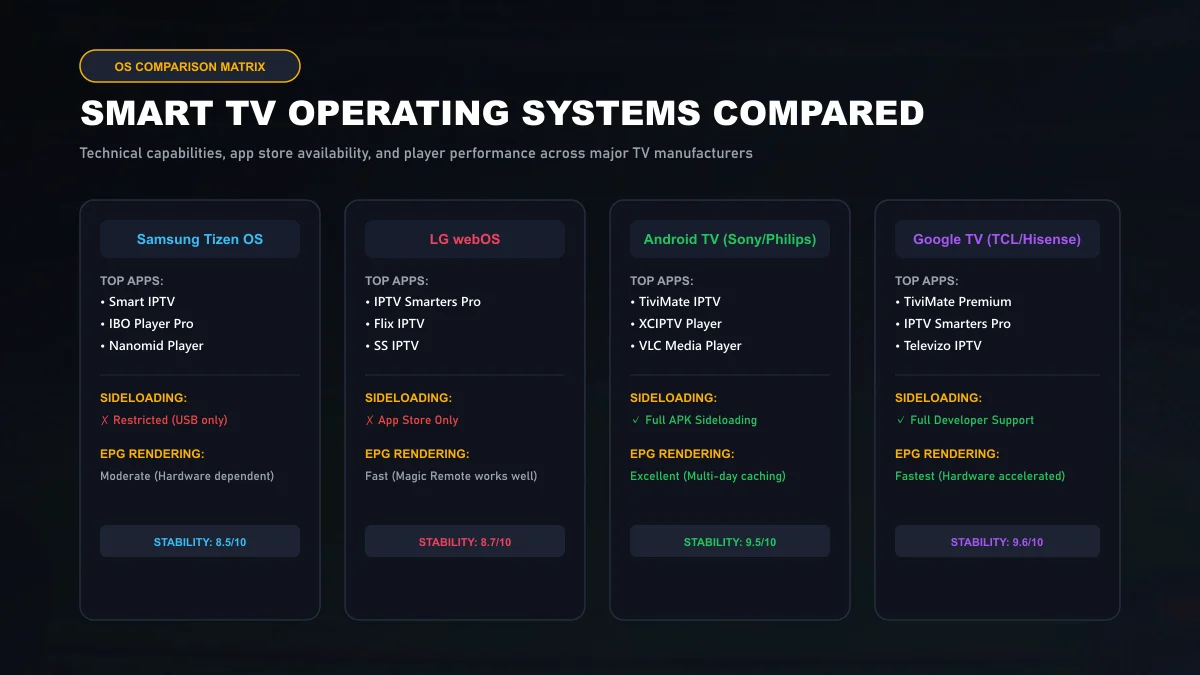
On Google TV and Android TV, you can install the industry-standard TiviMate IPTV Player directly, alongside XCIPTV, Televizo, and VLC Media Player.
Recommended Smart TV Player Apps
To help you select the optimal software for your specific hardware, the table below summarizes the leading Smart TV applications available in 2026:
| Player Name | Supported TV Platforms | Best Feature | Login Protocol |
|---|---|---|---|
| TiviMate IPTV | Android TV, Google TV | Unmatched EPG speed & 4-way multi-screen | Xtream Codes & M3U |
| IPTV Smarters Pro | LG webOS, Samsung Tizen, Android TV | Intuitive VOD movie & series posters | Xtream Codes API |
| IBO Player Pro | Samsung Tizen, LG webOS | Lightweight footprint on older hardware | Device ID & Key Portal |
| Flix IPTV | Samsung, LG, Android TV | Smooth Magic Remote cursor support | MAC Address Web Sync |
How to Add Xtream Codes on Smart TV
The Xtream Codes API is universally recognized as the fastest and most stable method for synchronizing an IPTV subscription. Rather than forcing you to type out a cumbersome 80-character M3U web address on a slow TV remote, Xtream Codes breaks authentication into three clean parameters:
- Launch your chosen Smart TV player: Open IPTV Smarters Pro or IBO Player from your TV app menu.
- Select 'Login with Xtream Codes API': Do not choose generic single-file playlist options if Xtream Codes is available.
- Input your Sasta TV credentials:
- Name / Playlist Title: Sasta TV
- Server URL: The edge URL provided in your activation message (e.g.,
http://sastatv-edge.net:8080) - Username: Your personal account identifier
- Password: Your unique alphanumeric secret key
- Click 'Add User' or 'Login': The app connects to the European Anycast CDN, verifies your active subscription, and downloads channel categories and VOD catalogs automatically.
If you need activation credentials, explore our transparent Sasta TV subscription tiers or verify our complete list of 25,000+ feeds on the global channel catalog.
How to Add M3U Playlists
Certain legacy Smart TV apps (such as Smart IPTV or older SS IPTV builds) do not support direct Xtream Codes API fields. Instead, they authenticate through a web-based playlist portal:
- Open the app on your Smart TV and note down your television's displayed MAC Address (format:
00:1A:79:XX:XX:XX). - Open a web browser on your smartphone or computer and navigate to the player developer's upload website.
- Enter your TV's MAC address into the device field.
- Paste your complete Sasta TV M3U Plus URL into the playlist link field.
- Click Send / Save, then restart the application on your television.
EPG Setup & Remote Usability
An accurate Electronic Program Guide (EPG) transforms chaotic lists of streams into a civilized television viewing experience. When properly configured:
- Auto-Time Shift Correction: If your TV guide schedules show programs 1 hour ahead or behind your local time, navigate to EPG Settings > Time Offset inside your player and select
+1or-1hour to align with local UK, US, or European time zones. - Remote Shortcut Buttons: Most Smart TV players map remote color buttons for convenience: Red toggles favorites, Green switches audio languages, and Yellow opens the EPG timeline.
Wi-Fi vs Ethernet for Smart TVs
A common surprise for Smart TV owners is discovering that their flagship 4K or 8K television comes equipped with a 10/100 Mbps Ethernet port rather than a Gigabit port. Even in 2026, leading TV manufacturers cap internal RJ45 LAN hardware at 100 Mbps.
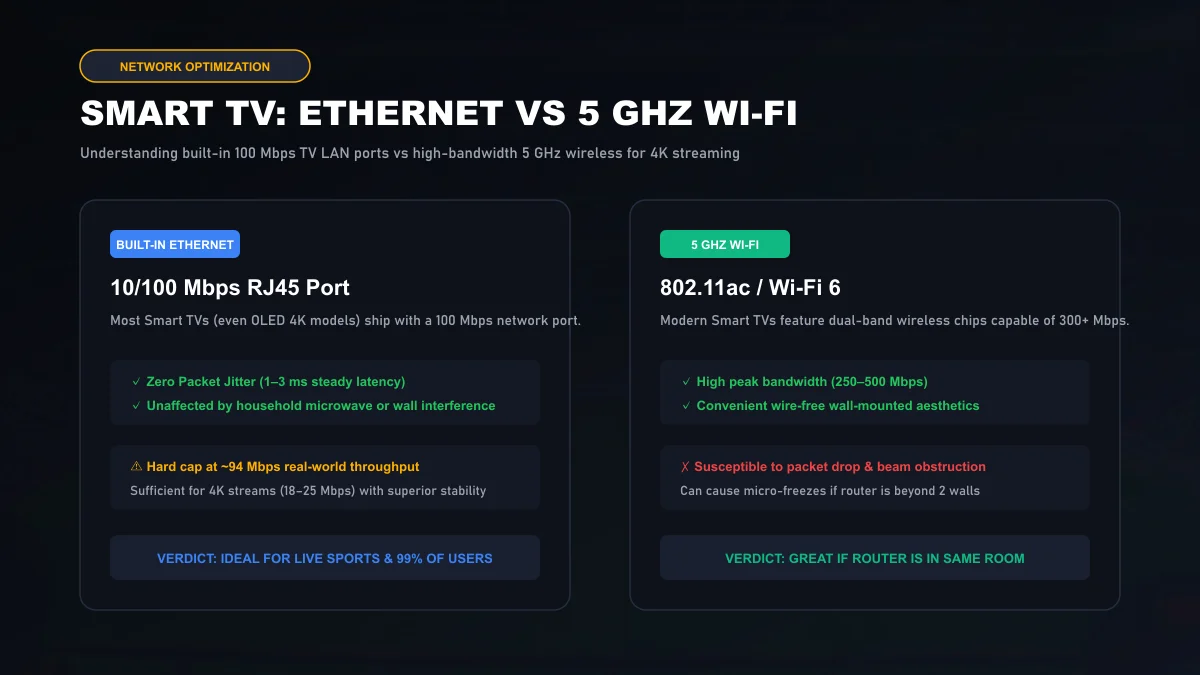
Despite this 100 Mbps ceiling, hardwired Ethernet is still strongly recommended. A 4K live sports stream consumes 18 to 25 Mbps. While 5 GHz Wi-Fi might show 300 Mbps in speed tests, wireless signals suffer from packet jitter and RF interference. An Ethernet cable guarantees constant, uninterrupted packet delivery with sub-3ms latency.
If you continue encountering micro-freezes on Wi-Fi, review our specialized IPTV buffering troubleshooting guide for DNS and router optimization techniques.
Troubleshooting Common Smart TV App Issues
Because Smart TVs have less onboard RAM than dedicated streaming devices, you may occasionally run into platform-specific glitches:
App Crashes on Catalog Download
If your player crashes while loading playlists, the app has exceeded your TV's available RAM. In Xtream Codes settings, filter out bouquets you do not watch (such as foreign language categories or non-essential VOD libraries) to reduce memory load by over 60%.
Black Screen with Audio Playing
This indicates a video codec incompatibility. Navigate to Settings > Player inside your app and switch the decoder from 'Software' to 'Hardware', or change the stream format output from MPEG-TS to HLS.
Smart TV Sleep Mode Disconnections
Many modern TVs enter an aggressive low-power standby mode when turned off, disabling background network chips and dropping active sessions. Disable 'Instant On' or 'Eco Standby' in your television system settings to preserve connection authentication.
Need personalized setup help for your specific television brand? Our team is available 24/7 through Sasta TV technical support or direct WhatsApp live assistance.
Smart TV Guide Frequently Asked Questions
Can I install TiviMate directly on my Samsung or LG Smart TV?
No. TiviMate is an Android-native application built for Android TV, Google TV, and Fire OS. Samsung TVs run Tizen OS and LG TVs run webOS, neither of which supports Android APK files. For Samsung and LG, excellent native alternatives include IPTV Smarters Pro, IBO Player Pro, Nanomid, or Smart IPTV.
Why does my Smart TV app store show paid activation for player apps?
Many Smart TV player apps (such as IBO Player, Smart IPTV, and Nanomid) are independent media players that charge a small one-time developer licensing fee (usually around €5 to €8) after a 7-day trial. Sasta TV provides the streaming content and credentials, but the player software developer operates independently.
Should I plug an Ethernet cable into my Smart TV for 4K streaming?
Yes, but be aware of hardware limits: virtually all Smart TV manufacturers (including Samsung, LG, and Sony) install 10/100 Mbps Ethernet ports. While capped at ~94 Mbps real throughput, this is more than double the 25 Mbps needed for 4K UHD and delivers zero jitter and packet loss compared to Wi-Fi.
How do I update channel lists when Sasta TV adds new channels?
If you connect using Xtream Codes API in your Smart TV app, channel lineups refresh automatically whenever you relaunch the application. If using an M3U playlist link, navigate to your app's playlist settings and click 'Reload Playlist' or 'Update Content'.
Does my Smart TV Magic Remote or Samsung Solar Remote work with IPTV?
Yes. Premium Smart TV IPTV apps like IPTV Smarters Pro and IBO Player fully support the LG Magic Remote air mouse pointer and Samsung D-pad navigation, allowing one-click channel switching, numerical input, and favorites management without extra remotes.
What should I do if my Smart TV app freezes when loading the channel catalog?
Smart TVs typically have limited RAM (1.5GB to 2.5GB). If an app tries to cache 25,000+ live channels and 120,000+ VOD items simultaneously, memory exhaustion can occur. Use Xtream Codes login to deselect bouquets you do not watch, or configure your player to cache only 1 day of EPG data.